The Real AI Agents Prompting Hub
Workflow Prompting & AI Automation: Turn Repeated Tasks Into Clear Systems
Workflow prompting helps you define what starts a process, what information AI receives, what it should do, what humans need to review, and what should happen next. Instead of trying to automate everything, the goal is to design clearer, repeatable systems where AI assists and people remain in control.

Start with the process
What Workflow Prompting Actually Means
A single AI prompt usually asks for one result. Workflow prompting goes further because it places AI inside a repeatable sequence with clear inputs, decision points, review steps, and expected outputs.
Define What Starts It
First, identify the trigger. It may be an approved article, a form submission, a scheduled review, a new file, or a manual request.
Define What AI Does
Next, give AI a clear task, the necessary context, and an expected output instead of asking it to guess what should happen.
Define Where Humans Decide
Finally, add review and approval wherever the result could affect another person, publication, permissions, money, or an important business decision.
One result vs. a repeatable system
A Prompt Is One Instruction. A Workflow Connects the Decisions Around It.
For example, “write a social media post” is a prompt. It may produce a useful draft, but it does not explain where the source information came from, whether the content was approved, who reviews the result, or what happens afterward.
By contrast, a workflow adds those missing decisions. An approved article can become the source, AI can extract the key points, platform-specific drafts can be created, and a human can review them before anything is published.

Build the chain
The Workflow Prompting Chain
A useful workflow becomes easier to understand when each stage has a clear job. Together, these eight parts create a practical foundation.

Before automation
Build the Workflow Before You Connect the Tools
A workflow should make sense on paper before software starts moving information between systems. Therefore, begin by describing the process in plain language.
Start With the Process
Start With the Task
Choose one repeated problem. Smaller workflows are easier to understand, test, and improve than an attempt to automate an entire business process at once.
Identify the Trigger
Then decide what starts the process. A trigger may be manual, scheduled, event-based, or tied to an approved piece of information.
Define the Inputs
Next, list the information the process depends on. Good outputs require clear, appropriate, and sufficiently complete inputs.
Define What AI Should Do
Write the AI Task
Tell the AI what to do, which source information to use, what context matters, and what it should avoid assuming.
Define the Output
After that, ask for a useful format such as a summary, checklist, categorized list, comparison, draft, or structured document.
Decide What Happens Next
Finally, add an intentional stopping point, approval stage, next step, or documentation requirement.

Keep people in control
Human Review Is a Workflow Step, Not an Afterthought
AI can organize information, prepare drafts, identify patterns, and help move work forward. However, some actions should pause until a person verifies the result.
This is especially important when a workflow could publish content, contact another person, modify a customer record, affect money, change permissions, delete information, or influence an important decision.
Interactive practice tool
Build a Foundation Workflow Prompt
Use this builder to organize one repeated task into a clearer workflow. First, define the process. Then direct the AI. Finally, identify where people review the work and what happens after approval.
The builder creates a planning prompt that you can copy and refine. It does not execute actions or connect to external systems.

Define the Workflow
Direct the AI
Keep Control
Match automation to risk
What Is Safer to Automate — and What Needs More Caution?
Lower-Risk Workflow Examples
Some tasks can benefit from AI assistance when the source information and intended use are appropriate. Even then, the workflow should match the actual level of risk.
- Organizing content ideas
- Turning approved notes into draft copy
- Summarizing non-sensitive research
- Formatting internal checklists
- Suggesting filenames or folder locations
- Preparing draft meeting summaries
- Categorizing information for human review
Tasks That Need Stronger Review
By comparison, more consequential actions may require additional verification, permissions, controls, or professional judgment.
- Sending messages automatically
- Publishing content automatically
- Changing customer or account records
- Financial or legal decisions
- Health-related decisions
- Changing access or permissions
- Deleting files or records
- Making purchases or commitments
- Handling confidential or sensitive information
See the structure in practice
Three Simple Workflow Prompting Examples
Content Workflow
Approved article → extract key points → draft platform-specific social copy → human review → approve → publish separately.
Research Workflow
Research question → gather approved materials → summarize findings → identify uncertainty → human review → save final notes.
Inquiry Organization
Incoming inquiry → categorize topic → summarize the request → prepare a draft response → human review → send separately.
Automate after understanding
From Documented Workflow to Connected Automation
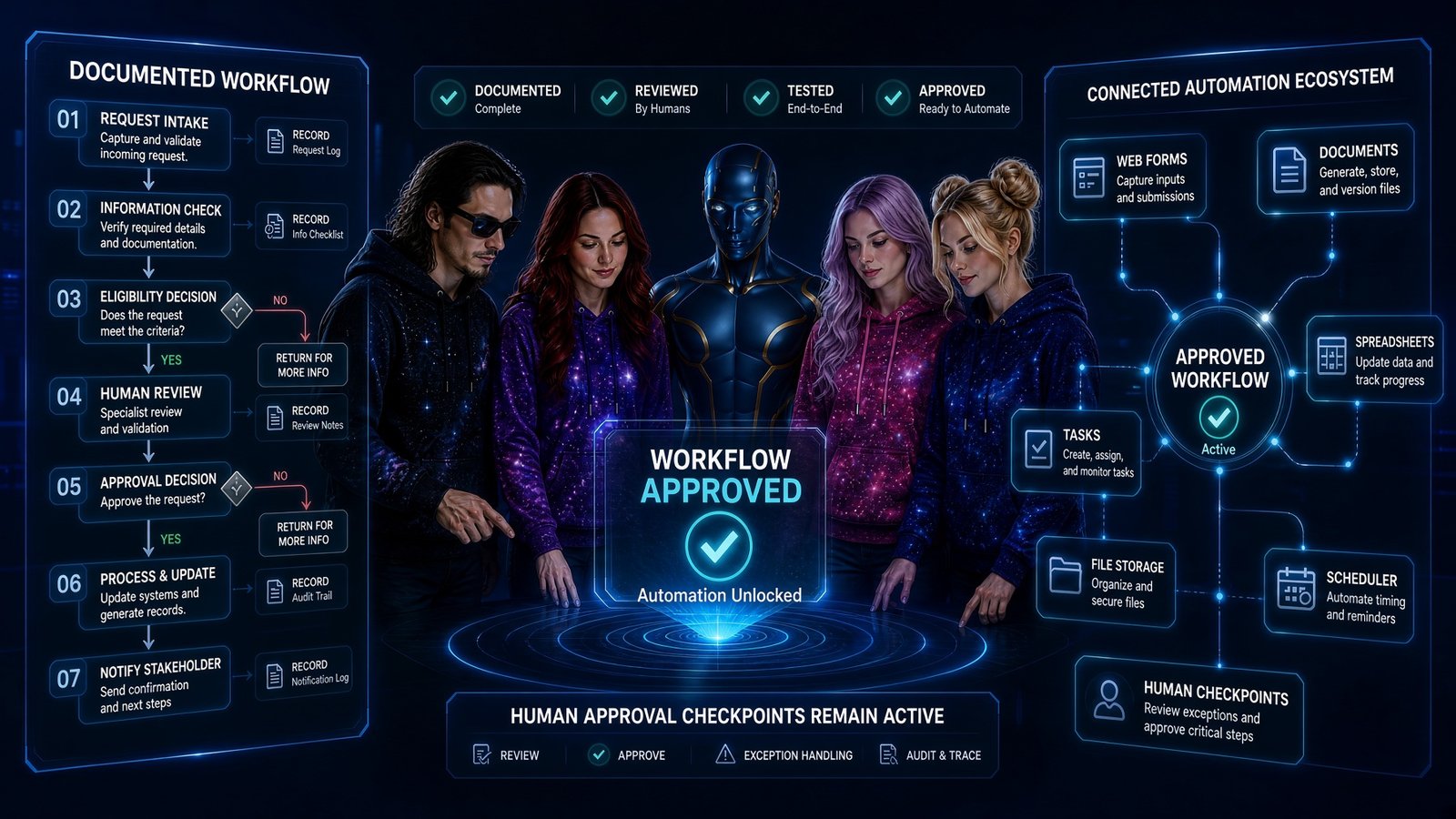
Once a process is documented, tested, and understood, you can decide whether connecting tools would actually improve it.
Connect Tools Only After the Workflow Makes Sense
For example, a connected system might use forms, documents, spreadsheets, task managers, schedules, or file storage. However, the technology should support the workflow rather than define it.
Meanwhile, human checkpoints can remain active even after tools are connected. As a result, the system can handle repeatable preparation while people retain control over exceptions and consequential decisions.
Keep building
Connect Workflow Prompting With the Rest of the Prompting Hub
Workflow prompting becomes even more useful when it connects with the other creative prompting paths on the site.
Image Prompting
Learn how subject, setting, style, lighting, camera direction, and visual references shape AI images.
Animation Prompting
Learn how source preservation, camera movement, subject motion, and scene direction shape AI video.
Music Prompting
Learn how style, mood, rhythm, instrumentation, vocals, and structure shape AI-assisted music.
AI Tools Hub
In addition, explore tools and platforms that can support different parts of creator and business workflows.
Explore AI ToolsCreator Network
You can also explore practical creator resources, workflow ideas, and AI-supported creative systems.
Explore the Creator NetworkPersonalized guidance
Need Help Turning a Repeated Process Into a Practical AI Workflow?
The Real AI Agents offers AI Tool & Workflow Advisory for creators and businesses that want help clarifying a process, comparing tools, reducing subscription overlap, or planning where AI can realistically support the work.
Because every workflow is different, recommendations depend on the information provided, the tools available at the time, and the needs of the specific process.
Start small
Build One Clear Workflow Before You Automate Ten Tasks
Choose one repeated task, define what starts it, identify the inputs, decide what AI should do, and add the human-review step. Ultimately, a small workflow that makes sense is more useful than a large automation no one understands.